TL;DR
- Simulated sunrise with Philips Hue + LED strips for natural wake-ups
- Smart heating that pre-warms my room before I wake up
- 15+ custom temperature sensors built with Wemos D1 + SHT31
- Motion sensors and automated cleaning with RoboVac
- Alexa + Homebridge integration for voice control and Apple ecosystem
- Home Assistant as the central brain running on Raspberry Pi 4
- Lessons learned and advice for fellow DIY enthusiasts
Check out the full technical breakdown for more details.
❄️ The Challenge: When German Winters Meet My Sleep Schedule
Most people bring posters to decorate their dorm. I brought a swarm of sensors and a personal sunrise.
Picture this: It’s 6 AM in Lemgo, January. The sun won’t rise for another two hours, and it’s -5°C outside. German winters are like living in a fridge that forgot how light works. By 4 PM, it felt like midnight, and by 6 AM, it was still pitch black. My body was confused, my sleep schedule was a mess, and I was spending way too much on heating trying to keep my dorm warm.
The situation improved significantly when I moved from a WG (shared apartment) to my own student dorm with a separate kitchen and bathroom. Having my own space made all the difference - I could finally implement proper smart home automation without worrying about roommates or shared spaces.
I remember thinking, “There has to be a better way than this.” And that’s when I decided to build something that would make my mornings less miserable. Little did I know, this simple desire to wake up without wanting to cry would lead me down a rabbit hole of smart home automation, custom hardware, and a whole lot of “why isn’t this working at 2 AM” moments.
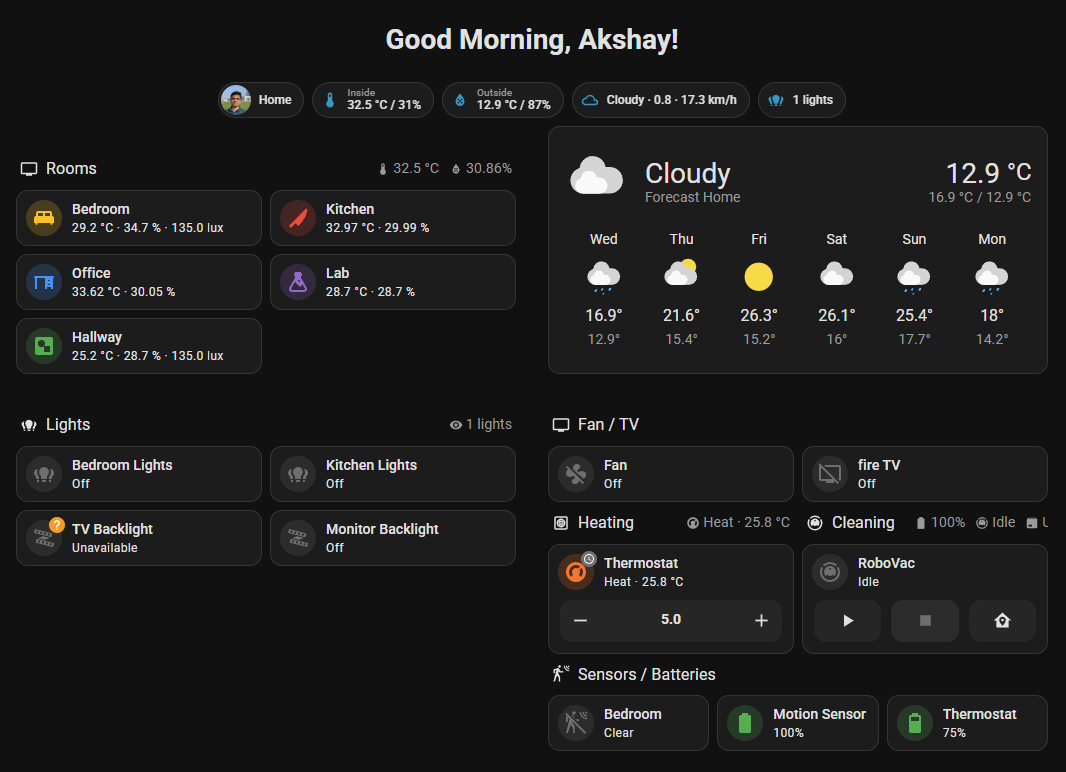
Caption: My main Home Assistant dashboard showing room controls, temperature monitoring, and automation status. This is where I control everything from lights and heating to my RoboVac and motion sensors.
🏠 What I Actually Built: From Simple Sunrise to Smart Home Madness
What started as a simple “let me wake up like a normal human being” project quickly spiraled into something much bigger. I built a smart home automation system that would make my dorm feel like a luxury hotel - minus the room service and the fact that I still have to do my own laundry.
The Sunrise Simulation (Because German Winters Are Depressing AF)
The core of my system is a sunrise simulation that’s so realistic, it could probably fool a rooster. I’m talking about Philips Hue bulbs that gradually brighten over 30 minutes, starting with a warm orange glow and transitioning to bright daylight. I also use WS2812B LED strips for ambient lighting effects. It’s like having a personal sun that actually shows up on time.
The best part? No more jarring alarm clocks that make me want to throw my phone across the room. Instead of being jolted awake by some aggressive beeping, I now wake up to a gentle light that gradually increases in intensity. It’s like nature intended, but nature clearly doesn’t understand that I need to wake up at 6 AM for work.
Smart Thermostat Control (Because I’m Energy-Conscious)
I wanted to be energy-conscious and not waste power, so I built a smart thermostat system that knows when I’m about to wake up and starts warming the room 30 minutes before my alarm.
The system is smart enough to check the weather forecast and adjust accordingly. If it’s going to be freezing outside, it starts heating earlier. If it’s a mild day, it doesn’t waste energy. It’s like having a personal butler who’s really good at thermodynamics and doesn’t judge me for sleeping in on weekends.
Custom Temperature Sensors (Because I’m a Data Nerd)
I built my own temperature sensors using Wemos D1 mini boards and SHT31 sensors. Why? Because I wanted to know exactly what’s happening in my dorm, and I didn’t trust the cheap sensors from Amazon. Plus, there’s something deeply satisfying about building hardware from scratch and watching it actually work.
My sensors are scattered throughout my student dorm - constantly monitoring every microclimate. I average all the values to set the perfect bedroom temperature, humidity, and illumination. Is it overkill? 100%. Is it fun? Absolutely. Do I have a problem? Probably.
Here’s my main Home Assistant dashboard showing all the room controls and automation:
Caption: My main dashboard where I control everything - lights, heating, RoboVac, and monitor all my rooms. You can see the temperature and humidity readings for each room, plus the weather forecast and device status.
And here’s my lab/server monitoring dashboard:
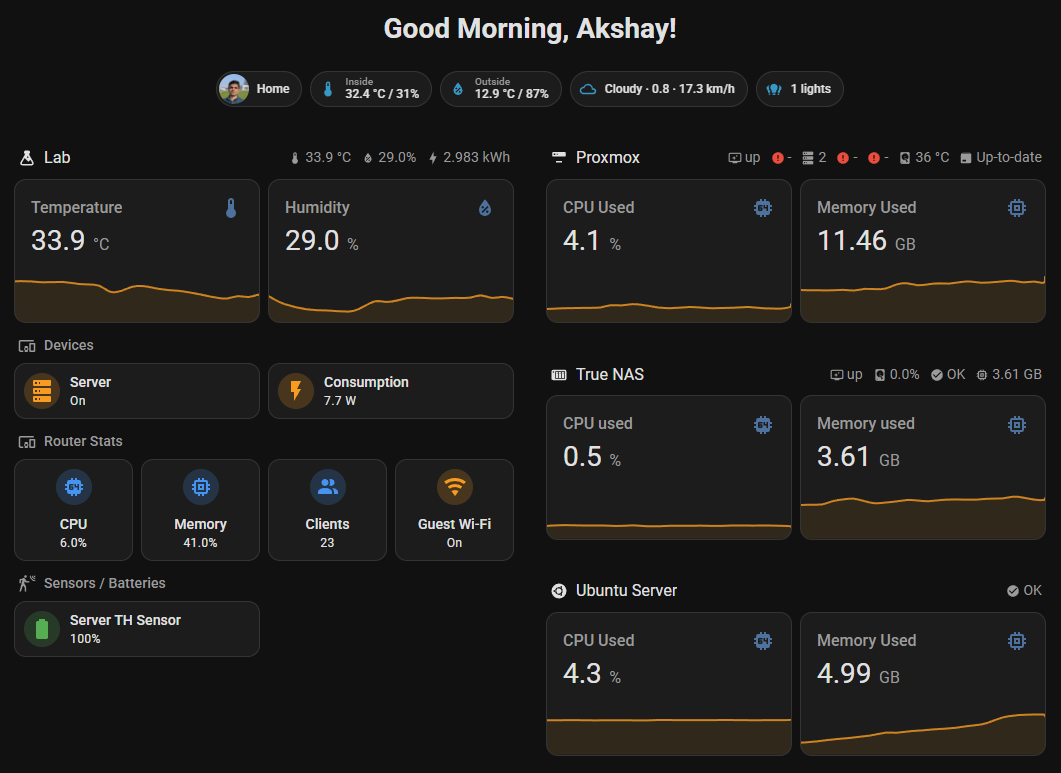
Caption: This dashboard focuses on my lab environment and server infrastructure. It shows the lab temperature/humidity, server status (Proxmox, TrueNAS, Ubuntu), router stats, and power consumption. It’s like having a data center control panel for my dorm.
Motion Sensors and Smart Cleaning (Because I’m Lazy)
Once I could see every microclimate in my tiny dorm, I wondered: what else could I automate to make life lazier? I added motion sensors to detect when I’m actually in the room (because apparently, I need technology to tell me where I am). The system knows when I’m home and adjusts everything accordingly. If my TV is on and I’m in bed, it automatically sets the lighting and temperature to “Netflix and chill” mode.
And because I’m too lazy to vacuum regularly, I added a RoboVac that automatically cleans when I’m not home. Nothing says “I have my life together” like a robot vacuum that cleans your dorm while you’re at work.
The Alexa Integration (Because Sometimes I Want to Feel Fancy)
Everything works with Alexa, so I can control my entire dorm with voice commands. “Alexa, turn on the lights” or “Alexa, set the temperature to 22 degrees” makes me feel like I’m living in the future. The only thing that’s not local is the Alexa requests themselves - everything else runs locally on my Home Assistant setup.
Homebridge for Apple Devices (Because I’m an Apple Fanboy)
I use Homebridge to integrate everything with my Apple devices, so I can control my dorm from my iPhone, iPad, or even ask Siri to turn off the lights. It’s like having the best of both worlds - the flexibility of Home Assistant with the convenience of Apple’s ecosystem.
If you want to learn more about setting up Homebridge and integrating it with your homelab, I wrote a detailed blog post about Homebridge Apple HomeKit integration. It’s like the missing piece that connects all your smart devices to your Apple ecosystem.
🛠️ The Technical Journey: From VM to Pi 4 (The Hard Way)
The Evolution: VM → Docker → Pi 4 (Because I Like Making Things Difficult)
I started this journey in October 2022, so I’m approaching my three-year anniversary, and let me tell you, it’s been a wild ride. I tried running Home Assistant as a VM in Proxmox first, because apparently, I like making things complicated. Then I switched to Docker containers, because I thought that would be easier. Spoiler alert: it wasn’t.
The biggest problem was mounting the Zigbee receiver to the Home Assistant VM. It was like trying to explain quantum physics to a goldfish - technically possible, but why would you want to? After months of fighting with USB passthrough and container networking, I finally gave up and bought a Raspberry Pi 4.
Best decision ever. Home Assistant OS on a dedicated Pi 4 runs flawlessly. It was like switching from flip-flops to actual running shoes — suddenly everything just worked.
If you’re interested in learning more about my homelab setup and the infrastructure behind this project, check out my Docker Services Homelab project and my blog post about building a homelab infrastructure. It’s like the backend to my smart home frontend.
Home Assistant: The Brain of My Dorm
I chose Home Assistant as my central hub because it’s like the Switzerland of smart home platforms - it plays nice with everyone. Plus, it has this amazing ability to integrate with custom hardware, which was perfect for my DIY sensor obsession.
The beauty of Home Assistant is that it speaks YAML fluently, which means I can configure everything in plain text. No more clicking through endless menus or dealing with proprietary apps that stop working when the company goes bankrupt. I appreciate anything that’s free and actually works.
Here’s a taste of how I configured my sunrise automation:
📋 Sunrise Automation YAML Configuration
automation:
  - alias: "Gradual Sunrise Wake Up"
    trigger:
      platform: time
      at: "06:30:00"  # Early enough to be responsible, late enough to not hate life
    action:
      - service: light.turn_on
        target:
          entity_id: light.bedroom_strip
        data:
          brightness: 0  # Start from darkness
          transition: 1800  # 30 minutes of gradual awakening
          rgb_color: [255, 200, 150]  # Warm sunrise color that doesn't hurt
Custom Hardware: Because I’m a Control Freak
Building my own sensors is also way cheaper than buying commercial ones, and I have complete control over every aspect of the system.
Here’s how I configured my custom sensors:
🔧 ESPHome Sensor Configuration
# ESPHome configuration for my DIY temperature sensor
esphome:
  name: bedroom_sensor  # Because creativity is overrated
  platform: ESP8266
  board: d1_mini  # The Wemos D1 mini - small, cheap, and reliable

# The sensors that tell me everything about my room
sensor:
  - platform: sht3xd  # High-precision temperature and humidity sensor
    temperature:
      name: "Bedroom Temperature"
      unit_of_measurement: "°C"
      accuracy_decimals: 2  # Because I want to know it's 21.47°C, not just 21°C
    humidity:
      name: "Bedroom Humidity"
      unit_of_measurement: "%"
      accuracy_decimals: 1
The Wemos D1 Mini: My Best Friend
The Wemos D1 mini has become my best friend in this project. It’s small, cheap, reliable, and perfect for DIY projects. I use them for both my temperature sensors and my LED strips. Here’s what one of my actual sensors looks like:
Caption: Yes, it looks like spaghetti. No, I wouldn’t change a thing.
The Lighting Setup: From Cheap Bulbs to Philips Hue
I started with cheap smart bulbs, but let me tell you - Philips Hue wins hands down. The quality, reliability, and color accuracy are just on another level. My main lighting is now done using Philips Hue bulbs, which provide excellent color temperature control and seamless integration with Home Assistant.
The cheap bulbs I used would burn out after just a couple of months, and when I tried to replace them with the same model from the same company, the colors looked identical in the app but were totally different in real life. It was like having a rainbow disco party when I just wanted consistent white light. Philips Hue bulbs, on the other hand, are consistent, reliable, and actually deliver the colors they promise.
For ambient lighting, I use LED strips with WS2812B LEDs controlled by Wemos D1 mini boards. These are the heart of my sunrise simulation system. They’re addressable, which means I can control each LED individually, creating smooth color transitions that actually look natural.
The best part? The combination gives me the best of both worlds - reliable main lighting with Hue and customizable ambient effects with LED strips. The worst part? I spent way too much time getting the color temperature just right.
The Dashboard: Because I Love Data and Charts
One of my favorite parts of this project is the dashboard I created. I use the Mushroom theme for Home Assistant because it looks clean and modern, and I’ve organized everything into different sections for each room.
I have separate views for each room (Bedroom, Kitchen, Office, Lab) with their own temperature and humidity graphs. It’s like having a control center for my entire dorm, and I can monitor everything from my phone.
The best part? I can control everything from my phone dashboard, but what fun is that? I wanted everything to just work automatically.
If you’re interested in learning more about dashboard design and monitoring systems, check out my blog post about building a homelab dashboard. It’s like the big brother to my Home Assistant dashboard, monitoring all the infrastructure that makes this smart home possible.
🔒 Privacy & Security: Because Your Data Should Stay Yours
One of the biggest advantages of this setup is that everything runs locally. Your temperature data, lighting preferences, and daily routines never leave your network. Unlike cloud-based smart home systems that send your data to who-knows-where, Home Assistant keeps everything on your Raspberry Pi.
This local-first approach means:
- No internet required for basic functionality
- No data mining of your daily habits
- No subscription fees or service dependencies
- Complete control over your automation logic
The only external connections are for weather data (for smart heating) and Alexa voice commands, but even those can be disabled if you prefer complete privacy.
Want to see the cost breakdown and get started? Check out the detailed cost analysis and quick start guide on my project page.
🔧 The Biggest Challenges: When Life Meets Technology
Of course, behind every sleek dashboard is a graveyard of failed attempts.
1. Custom Hardware Development: The Soldering Saga
Building temperature sensors from scratch was a great idea, and thankfully my soldering skills were up to the task. While I’m not new to soldering, working with these tiny Wemos D1 boards still required some precision and patience. The compact size and close component spacing made it a bit more challenging than larger projects.
The biggest challenge was getting the WiFi connectivity to work reliably. These little Wemos D1 boards can be picky about their WiFi settings, and I spent some time fine-tuning the connection parameters to ensure stable communication with Home Assistant. At 2 AM, I was hunched over my desk with a soldering iron, muttering at a blinking LED like it owed me money. There’s nothing quite like the satisfaction of seeing all your sensors reporting data consistently to your dashboard.
2. Sunrise Simulation: The Color Temperature Obsession
Getting the sunrise simulation to feel natural was harder than I expected. I went through so many different color combinations to find the perfect balance between warm and natural.
The challenge was finding the right balance between warm enough to feel natural but not so warm that it looks like my room is on fire. I tested everything from candlelight warm to daylight bright, and I’m pretty sure my neighbors got tired of me asking “Does this look natural?” every five minutes.
3. German Weather: The Ultimate Adversary
German weather is like a moody teenager - unpredictable and often unpleasant. One day it’s -15°C, the next it’s +20°C, and my system had to handle all of it gracefully.
The biggest challenge was programming the heating logic to be smart enough to predict when I’d need heat without wasting energy. I wasn’t about to heat my dorm like a sauna just because the weather forecast was wrong.
4. The Trash Schedule Problem (Because German Bureaucracy)
In Lemgo, Germany, there’s a schedule for which day you can keep which bin out so the trash truck can pick it up. There are 4 different types of trash bins: blue (paper), brown/black (general waste), green (organic), and yellow (packaging). But 90% of the time, I forget which bin goes out on which day. So I added a reminder in Home Assistant based on the schedule. Now I miss it 80% of the time instead of 90%, which I guess is progress?
Here’s how I set up the trash reminder automation:
🗑️ Trash Reminder Automation
automation:
  - alias: "Trash Collection Reminder"
    trigger:
      platform: time
      at: "19:00:00"  # Evening reminder
    condition:
      - condition: time
        weekday:
          - mon  # Monday for general waste (brown/black bin)
          - tue  # Tuesday for paper (blue bin)
          - wed  # Wednesday for organic (green bin)
          - thu  # Thursday for packaging (yellow bin)
    action:
      - service: notify.mobile_app_my_phone
        data:
          title: "🗑️ Trash Day Tomorrow!"
          message: >
            {% if now().weekday() == 0 %}Put out the BROWN/BLACK bin (general waste)
            {% elif now().weekday() == 1 %}Put out the BLUE bin (paper)
            {% elif now().weekday() == 2 %}Put out the GREEN bin (organic)
            {% elif now().weekday() == 3 %}Put out the YELLOW bin (packaging)
            {% endif %}
It’s a simple automation, but it’s saved me from missing trash collection more times than I can count. German bureaucracy is complicated, but at least my smart home can help me navigate it.
5. The “It Works Sometimes” Problem
This is an expensive hobby, and there’s always something that breaks or doesn’t work as intended. Sometimes the automation works perfectly, and sometimes you need to turn it off in the middle of the night because your lights are randomly turning on and off like you’re hosting a rave.
But that’s when you learn something new. Thanks to the home automation community for lots of inspiration and for helping me debug why my sensors randomly go offline at 3 AM.
🎯 What I Learned: The Wisdom of a DIY Enthusiast
Building hardware from scratch is deeply satisfying but comes with challenges - WiFi and microcontrollers don’t always play nice, especially in cold environments. I learned to always have backup plans and never trust that a sensor will work just because it worked yesterday.
The biggest revelation was that lighting is more than illumination - it’s about creating an environment that makes you feel good. Color temperature matters more than I thought: 2700K feels warm and cozy, while 6500K feels like you’re in a hospital.
Living in Germany taught me that weather forecasting is more art than science. One day it’s -15°C, the next it’s +25°C, and your heating system needs to adapt accordingly. I learned to always have multiple fallback options and never assume the weather forecast is accurate.
Home Assistant’s power lies in its ability to integrate custom hardware with commercial devices. The YAML-based configuration makes everything transparent and version-controllable. The biggest lesson: automation is only as good as the data it’s based on. Having accurate sensors and reliable connectivity is more important than fancy automation logic.
🚀 The Impact: From Chaos to Smart Home Life
Before this system, my mornings were a disaster. I’d wake up to a jarring alarm clock, stumble around in the dark, and realize my dorm was freezing because I’d turned the heat off to save money. I’d spend the first hour just trying to get my body temperature back to normal, and by the time I was functional, half the morning was gone.
Now, my mornings are completely different. I wake up to a gentle light that gradually brightens, and my room is already warm because the system started heating 30 minutes before my alarm. I actually feel good when I get out of bed.
📊 The Results
- Sleep Quality: According to my Apple Watch, I’m sleeping better and waking up feeling more rested. The gradual sunrise simulation starts 30 minutes before my alarm, eliminating jarring wake-ups and helping my circadian rhythm adjust to German winter darkness
- Temperature Control: Consistent 21-22°C with ±0.5°C accuracy. My custom SHT31 sensors monitor every room, and the system pre-heats 30 minutes before I wake up based on weather forecasts
- Comfort Level: Consistently comfortable without manual intervention. Motion sensors detect when I’m home, automatically adjusting lighting and temperature to “Netflix and chill” mode when I’m in bed
- Peace of Mind: Control everything from my phone, even when I’m not at my dorm. If I leave something on and my phone isn’t home with no motion detected for 20 minutes, the system automatically turns everything off
🔮 What’s Next: The Never-Ending Project
The system has grown far beyond what I initially imagined, with comprehensive automation already in place. But of course, I can’t stop there.
Still on my wishlist:
- Automated blinds/shades that sync with sunrise/sunset. I want them to automatically open when the sun rises and close when it sets, creating a seamless transition between natural and artificial lighting. This would complete the circadian lighting system and eliminate the need to manually adjust window coverings.
- Smart plant care with soil moisture sensors and automated watering. I’m planning to add sensors to monitor soil moisture, light levels, and temperature for my indoor plants. The system would automatically water them when needed and adjust grow lights based on the plants’ requirements.
This is getting ridiculous, but I can’t stop. It’s like an addiction, but instead of drugs, I’m addicted to making my dorm as automated as possible.
💡 Key Takeaways
The most meaningful solutions come from solving real, personal problems. I wasn’t trying to build the next big thing - I was just trying to make my mornings less miserable. That simple motivation led to something that has genuinely improved my quality of life.
The Home Assistant ecosystem demonstrates the incredible power of open-source solutions. I built a sophisticated smart home system without spending thousands on proprietary equipment, and I have complete control over every aspect of it. Open source gives you the freedom to customize, modify, and improve your system however you want.
The system has fundamentally changed how I experience mornings in Germany. Instead of struggling with cold, dark winter mornings, I now wake up to a gradually brightening room with perfect temperature. It’s a small change that has made a big difference in my daily routine and overall well-being.
It’s a great conversation starter when people visit my dorm and see temperature sensors scattered around. Most people are either impressed or think I’m completely insane - there’s no middle ground.
🚀 Ready to Start Your Own Smart Home Journey?
If you’re thinking about starting your own smart home project, my advice is: start small, be prepared for things to break, and always keep spare Wemos D1 mini boards. Also, don’t be surprised if your dorm ends up with more technology than most people’s entire houses. It’s not a problem, it’s a feature.
Want to see the full technical breakdown, cost analysis, and quick start guide? Check out my Home Assistant Smart Home Automation project page for detailed setup guides, code examples, pricing breakdown, and a step-by-step quick start guide to get you from zero to smart home hero.
This smart home system continues to evolve as I add new sensors and automation capabilities. The journey of building an intelligent home is ongoing, and each addition brings new possibilities for automation and comfort. From a simple sunrise simulation to a comprehensive climate control system, this project has shown me the true potential of DIY smart home automation.
And yes, I’m still adding more sensors. The next thing on my list is automated blinds, because I can’t be bothered to manually open and close them like a normal person.
Thanks to the home automation community for all the inspiration and for helping me debug why my sensors randomly go offline at 3 AM. You’re the real MVPs.
What started as a desperate attempt to survive German winters has turned into the best part of my daily routine. My dorm now has more sensors than NASA — and I wouldn’t have it any other way. If you’re thinking about starting your own smart home journey, go for it… just don’t be surprised when you end up muttering at blinking LEDs at 2 AM too.
Send help. (Actually, send more Wemos boards.)