TL;DR
The apartment already had lights, motion sensors, and a thermostat. What it did not have was a truce.
This week I rewrote the lighting and heating so each automation has one job, and so a manual change wins for a while:
- Wake-up, sunset, and bedtime fade the Hue bulbs and the WLED strips together, from 1% up or down to off
- Daytime is per room: a dark kitchen can turn on while a bright bedroom stays off
- A manual change pauses the schedule for two hours, for lights and for heat
- Leaving home kills the lights, stops the music, and drops the heating to an away setpoint
- Vacation mode keeps the place looking lived-in for a few minutes at a time, without running the normal routines
This is the follow-up to the original dorm automation write-up. Same rooms. Much less arguing.
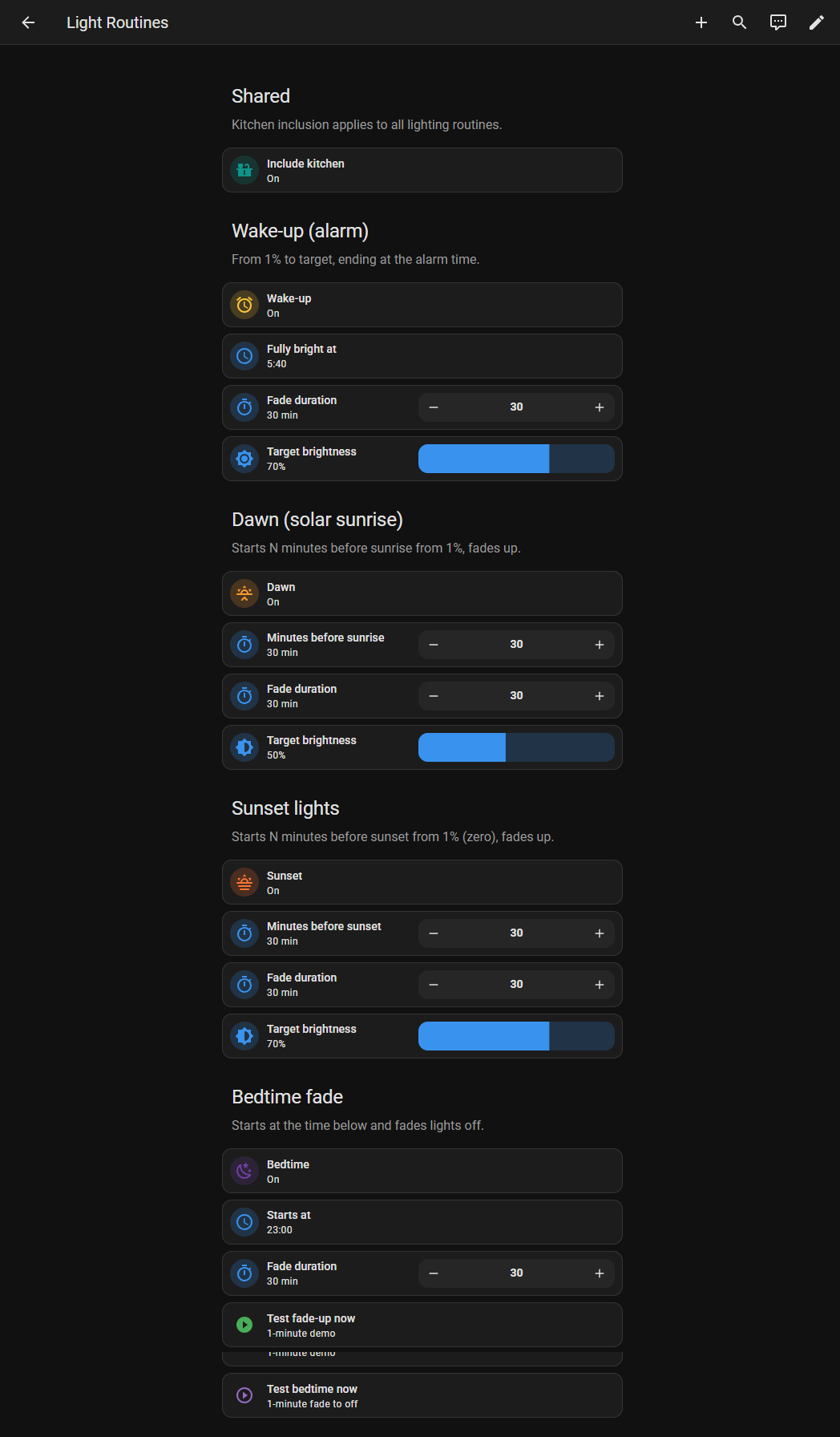
Caption: The Light Routines view. Wake-up ends fully bright at the alarm time. Dawn, sunset, and bedtime are separate switches so I can turn one off without breaking the others.
The Problem: Four Automations, One Pair of Rooms
The old behavior was easy to describe and annoying to live with.
A fade would start, then the daylight automation would decide the room was still dark and jump the brightness. I would turn a light off from the Hue app, and something else would turn it back on. The kitchen and the bedroom were treated as one space, so a sunny kitchen could still drag the bedroom along with it. Heating was on its own clock, unrelated to when I actually get up.
None of that is a hardware problem. It is a priority problem.
The rule I wanted is small:
- A timed fade owns the lights while it is running.
- Daylight only fills in when nobody else is driving.
- If I touch a light or the thermostat myself, the schedule waits.
- Away and vacation are different modes, not slightly broken versions of “home”.
What a Normal Day Looks Like Now
Wake-up
Wake-up is an alarm, not a sunrise calculation.
The default is fully bright at 05:40, after a 30 minute fade, ending at 70%. The automation starts at wake-up time − duration, snaps the bedroom (and the kitchen, if I include it) to 1%, waits a couple of seconds, then transitions to the target. The WLED strips in that room ride along with the Hue bulbs, so the fade is the whole room and not just the ceiling.
Dawn is its own switch. It is on right now: 30 minutes before sunrise, fading to 50%, and only if the bedroom still needs light. The alarm is still the one that matters on a dark morning. German winters do not wait for the sun.
Daytime
From 08:00 until the sun is up, each room watches its own illuminance sensor.
- Above 30 lux for a minute: that room’s Hue and WLEDs turn off.
- Below 10 lux for five minutes, and only if I am home and the TV is off: that room comes back on.
Brightness follows the hour: 70% through the afternoon and evening window, lower late at night. The other room is left alone. A bright kitchen no longer turns the bedroom into a debate.
The sunset fade gets a protected window. Ambient will not turn a room on during the half hour before sunset, because that is when the sunset routine is supposed to own the fade. If a room is already on, sunset leaves it alone instead of restarting it at 1%.
Evening and bedtime
Sunset starts 30 minutes before sunset, only in a room that is still off and still dark (lux at or under 30). It fades to 70% over 30 minutes.
Bedtime is a clock, default 23:00. It clears guest-motion mode and fades the same lights to off over 30 minutes.
During every fade, a timer called auto lighting pause is running. Ambient is not allowed to touch the lights until that timer is idle, plus a few extra minutes so the end of the fade does not immediately get overwritten.
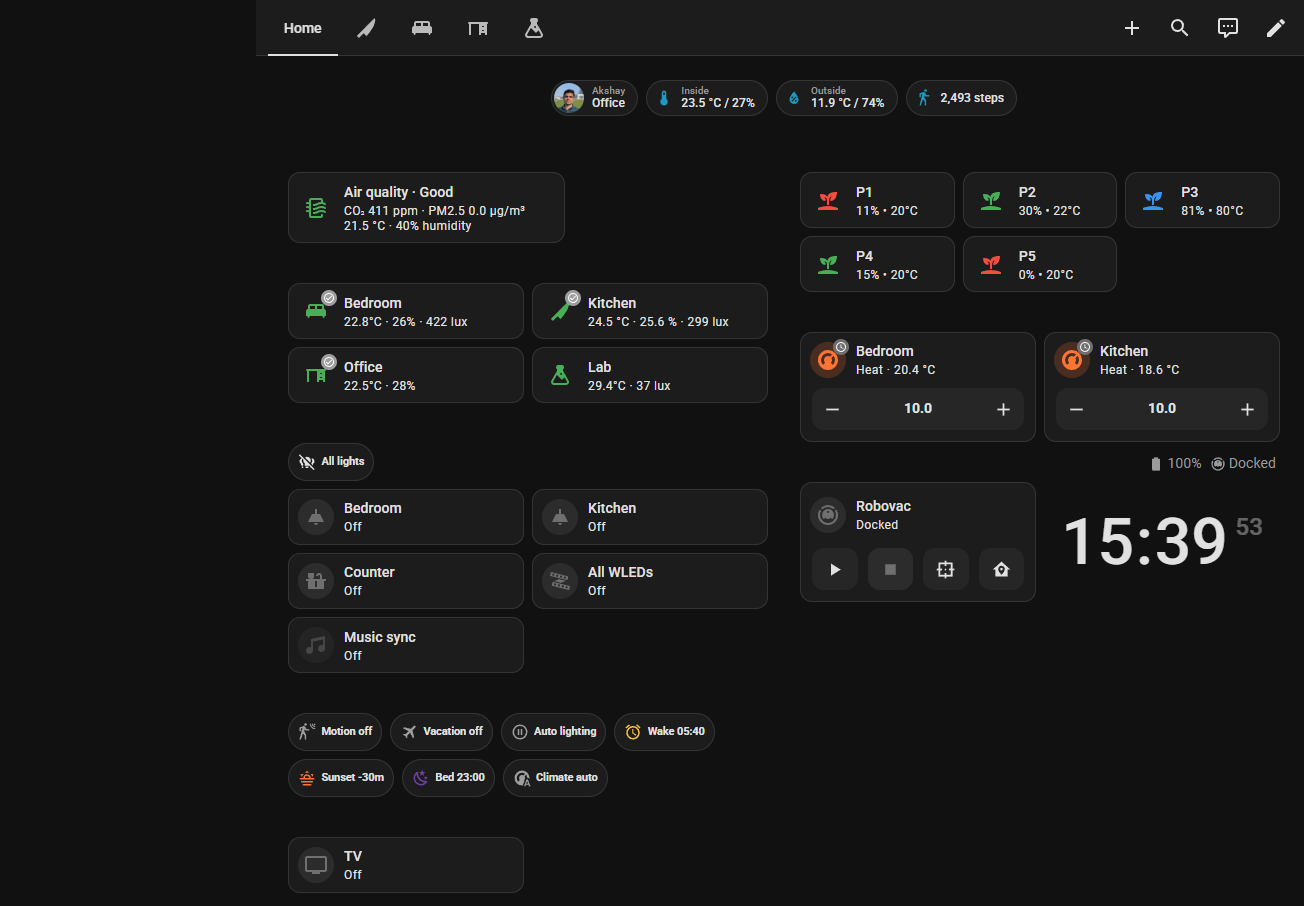
Caption: The home view. Motion, vacation, and the lighting pause sit in one chip row, so I can see which mode is currently allowed to drive the rooms.
Manual Changes Win for Two Hours
This was the bug that made the rest feel broken.
If I turn a Hue room on or off from the Home Assistant app, or if the room is switched off from Alexa or the Hue app, the ambient automations pause for two hours. The check is the context on the state change: if another automation caused it, there is a parent id, and the pause does not start. Fades do not pause themselves.
The thermostat works the same way. A manual mode or setpoint change, while I am home, starts auto climate pause for two hours. When that timer finishes, the schedule applies again.
Arrival does not wait on the lighting pause. If I walk in and a room is under 10 lux with the light still off, that room and its strips come on at 50%. Leaving home cancels both pause timers, so I do not come back to a schedule that is still sulking about a change I made yesterday.
Heating Follows the Alarm
The target is one template sensor, sensor.heating_schedule_target. The heating automation only writes to the thermostat and the radiator valve when the target or the mode is actually different, so it does not keep poking the valves.
While I am home, and vacation is off, and the climate pause is idle:
| Window | Setpoint |
|---|---|
| From 90 minutes before wake-up until 08:30 | 27°C |
| 08:30–17:00, weekdays | 21°C |
| 08:30–17:00, weekends | 21.5°C |
| 17:00–22:00 | 22°C |
| Overnight | 19°C |
The morning block is tied to input_datetime.wake_up_time. If I move the alarm, the preheat moves with it. The room starts warming an hour and a half before the lights finish their fade.
Away, or vacation, the target becomes the away setpoint. The default is 10°C. Leaving home sets that immediately, and it also turns the lights off, stops the TV, stops Spotify, and tells Alexa to stop music.
Guest Motion and Vacation Are Modes, Not Extra Automations Fighting the Schedule
Guest motion only runs when its switch is on. It can drive Hue, a motion WLED, or both, and only if the room is under a lux threshold (default 70). Brightness is either manual or a small time-of-day value. Turning on uses a 2 second transition. Turning off waits for the timeout (default 1 minute) and then fades out over 3 seconds. It does nothing during vacation, and nothing while the lighting pause is active.
Vacation is the away version of “someone is home”, and it is deliberately small. Between 16:00 and 23:00, about every 45 minutes, it may turn on either the kitchen or the bedroom for a few minutes at a dim brightness (defaults: 10 minutes, 40%). It pauses ambient so the daylight logic does not fight it, and it sets the heating to the away setpoint. Wake-up, sunset, and bedtime do not run. When I arrive home, vacation turns itself off.
Where It Lives
The helpers are packages, so the source of truth is git instead of a pile of UI-created helpers:
packages/lighting_routines.yaml— wake-up, dawn, sunset, bedtimepackages/climate.yaml— away setpoint and the climate pause timerpackages/guest_motion.yaml— motion mode, brightness, timeout, luxpackages/vacation.yaml— the away presence switch
The automations and the fade scripts stay in automations.yaml and scripts.yaml. The dashboard has a Light Routines view with a one-minute test for the fade-up and the fade-to-off, which is the only sane way to tune a 30 minute sunrise.
What I Learned
- Per room is the whole fix. One lux number for the apartment was why the automations felt random.
- A pause timer is simpler than a web of conditions. Fades, manual edits, and vacation all set the same timer. Ambient only checks that the timer is idle.
- Do not write the thermostat if it is already there. Comparing the current setpoint first stopped a lot of useless valve traffic.
- Away is a mode. Lights, media, and heat should all change together when I leave, and come back on purpose when I return.
The music-reactive strips are a separate switch on top of this. That one is the next post.
House rule: if two automations can both see the same light, one of them has to be holding a timer.