TL;DR
I finally gave my homelab a voice.
Not a dramatic one.
Not a “panic for every CPU spike” one.
Just a calm, useful, slightly judgmental voice that says:
- a host is down
- CPU has been high for a while
- memory is staying under pressure
- disk is filling up
- a filesystem went read-only, which is never a fun sentence
The alert flow now looks like this:
Prometheus -> Alertmanager -> Home Assistant -> phone notification
That turned out to be the sweet spot. Prometheus evaluates alert rules, Alertmanager handles grouping/dedup/routing, and Home Assistant becomes the notification hub that can fan alerts out however I want.
The Problem: Metrics Are Great, But They Don’t Tap You on the Shoulder
In my earlier observability setup, Prometheus was already scraping the important things and Grafana was doing a great job showing me dashboards. That solved the “what is happening?” problem beautifully.
It did not solve the “hey, maybe look at this before the server turns into a space heater” problem.
Dashboards are passive. They wait for you to remember to open them.
Alerting is what closes the loop.
This post is basically the follow-up chapter to my earlier observability stack write-up: same metrics foundation, but now with an actual way for the stack to interrupt me when it matters.
I didn’t want to build some massive enterprise alerting monster on day one. I wanted a setup that was:
- easy to extend
- understandable at 2 a.m.
- friendly on mobile
- not noisy enough to make me mute it after one weekend
So the goal became simple: start small, alert on the boring-but-important infrastructure problems first, and make sure the notifications are actually readable.
The Architecture (in human words)
This is the alerting pipeline:
1. Prometheus evaluates rules
I added alert evaluation directly in Prometheus using a dedicated rules file. Instead of stuffing everything into the main config, I split the alert rules into a separate alerts.yml so the setup stays organized and easy to grow.
That means:
prometheus.ymlstays focused on scrape jobs and core configalerts.ymlbecomes the single place where alert logic lives- adding new alerts later feels like extending a rulebook instead of editing a junk drawer
2. Alertmanager handles the alert lifecycle
Prometheus is good at deciding when something is wrong.
Alertmanager is good at deciding what to do about it.
So I wired Prometheus to Alertmanager for:
- routing
- grouping
- deduplication
- sending resolved notifications
This is one of those additions that feels boring until it saves you from five duplicate notifications about the same issue.
3. Home Assistant becomes the notification hub
Instead of sending alerts directly from Prometheus to some destination, I routed them through Alertmanager into Home Assistant using a webhook.
That gave me a bunch of nice benefits:
- one place to control notification behavior
- easy formatting improvements
- access to existing Home Assistant notification channels
- mobile push notifications through the Home Assistant app
- a cleaner path for future additions like Telegram, dashboards, TTS, or automation side effects
Basically: Prometheus detects, Alertmanager organizes, Home Assistant delivers.
Why I Chose Home Assistant for Notifications
This might sound slightly weird if you think of Home Assistant as “the lights and sensors thing,” but it turns out to be a really good notification router.
I already use Home Assistant as the local automation brain in the homelab, so sending alerts there made more sense than wiring each monitoring tool directly to a phone app or messaging platform.
That approach keeps the design modular:
- Prometheus stays responsible for evaluation
- Alertmanager stays responsible for alert delivery policy
- Home Assistant stays responsible for notifications and user-facing presentation
It also means I can improve how alerts look on my phone without changing the Prometheus rule logic.
I am a big fan of anything that reduces YAML arguments between different systems.
The First Rule: Start Small, Stay Sane
One of the easiest ways to ruin alerting is to try to alert on everything immediately.
So I started with a small, practical set of infrastructure alerts:
InstanceDown- high CPU usage
- high memory usage
- low disk space / high filesystem usage
- read-only filesystem
This set catches the “something is genuinely wrong or getting unhealthy” layer without turning every short-lived metric wobble into a push notification.
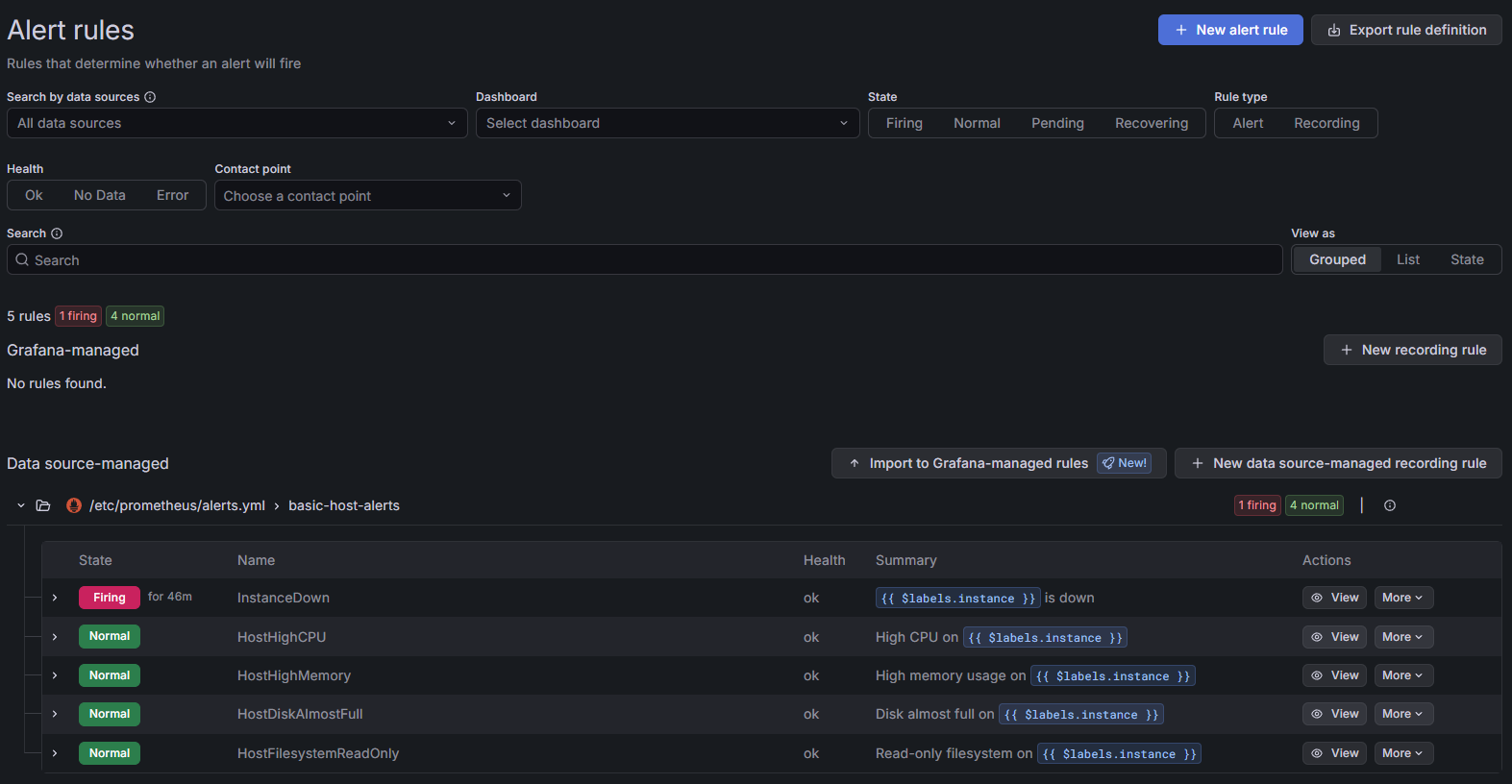 Caption: A small, practical starter pack: one firing
 InstanceDown alert and a few calm infrastructure rules waiting for their turn to be dramatic.
The Alerts I Added
InstanceDown
The classic first alert.
If a monitored target stays unreachable for more than 5 minutes, I want to know. Not after 30 seconds, and not because a service restarted during a normal deploy. Five minutes is a nice “this is probably real” threshold.
This is the alert that answers:
- did the host disappear?
- did the exporter die?
- is the service really unreachable and not just momentarily grumpy?
High CPU usage
I added host-level CPU alerts for sustained pressure, not momentary spikes.
That’s an important distinction. A burst of CPU is normal. A machine staying hot for long enough to cook breakfast is more interesting.
Using a for: window helps a lot here, because it filters out short spikes and only notifies when the condition sticks around.
High memory usage
Same story with memory.
Memory gets weird in Linux because “used” doesn’t always mean “trouble,” so the real goal is to catch sustained memory pressure that actually suggests the host is running uncomfortably close to the edge.
Again, the time window matters more than the raw threshold by itself.
Low disk space / high filesystem usage
Disk alerts are the ones that always feel unnecessary until suddenly they are the most important alert in the room.
I added host-level filesystem usage alerts so I get a warning before a box runs out of room entirely.
Because “root partition full” is one of those problems that somehow manages to break things in the least convenient way possible.
Read-only filesystem
This one is more severe.
If a filesystem flips into read-only mode, that usually means something has gone properly sideways. This is the kind of alert I want to stand out as more urgent than “CPU is busy.”
That is where labels like severity become useful. A warning and a critical condition should not feel identical when they arrive on a phone.
Reducing Noise on Purpose
I really did not want to build a notification system that teaches me to ignore it.
So I leaned on three things:
Time windows with for:
This is the easiest anti-noise tool in Prometheus alerting.
Instead of firing the second a threshold is crossed, I require the condition to stay bad for a while. That keeps short spikes, transient host hiccups, and brief exporter restarts from becoming notifications.
Severity labels
I used labels like severity to distinguish warning vs critical conditions. That gives Alertmanager and Home Assistant more context to work with, and it makes future routing easier too.
Good annotations
Readable summary and description annotations matter a lot.
An alert should be understandable without opening Prometheus. If a notification lands on my phone, I want to know what happened, where it happened, and how worried I should be, in about one glance.
That sounds obvious, but bad alert text is one of the fastest ways to make a good monitoring stack feel annoying.
Friendly Host Names Beat Raw Targets
One of the quiet quality-of-life wins was using friendly host names via the instance label.
Because:
media-serveris helpful192.168.x.x:9100is technically accurate but emotionally useless
Once the instance label is human-friendly, the alert text becomes dramatically better. That improvement carries all the way through Prometheus, Alertmanager, Home Assistant, and mobile push notifications.
Tiny labeling decisions do a lot of work.
Home Assistant Webhook Automation
On the Home Assistant side, I created a webhook automation to receive payloads from Alertmanager.
That automation turns incoming alert data into Home Assistant notifications, and from there I can forward them however I want. In my case, the important path is mobile push through the Home Assistant companion app.
This is where a lot of the user-facing polish lives:
- cleaner message formatting
- friendlier wording
- different handling for active alerts vs resolved alerts
- notifications that read well on a lock screen
I also replaced raw alert-state wording with more human-friendly text where it made sense. “Resolved” is technically fine, but sometimes a softer “back to normal” or “recovered” reads better when you’re glancing at a phone.
The job of the notification is not to sound clever. The job is to be instantly legible.
Recovery Notifications Matter More Than People Admit
I kept send_resolved: true enabled so recovery notifications are delivered too.
That matters for two reasons:
- it closes the loop
- it saves me from wondering whether the problem fixed itself or just stopped yelling
An alert without a recovery message is like a fire alarm that never announces the building is safe again.
Now I get both sides of the story:
- problem notifications when something enters a bad state
- recovery notifications when it comes back to normal
That makes the whole system feel much more trustworthy.
Testing Before Trusting
Before I let Prometheus drive the whole thing, I tested the Home Assistant webhook directly with a manual curl payload.
This was absolutely the right call.
It let me verify:
- the webhook endpoint worked
- the payload shape made sense
- Home Assistant automation parsed the alert data correctly
- notification formatting looked good on mobile
Only after that did I verify the full end-to-end flow:
Prometheus -> Alertmanager -> Home Assistant
That full-path test is the moment alerting stops being “configured” and starts being real.
What This Setup Actually Improved
The big win is not just that I now receive alerts.
The big win is that the system is structured in layers that each do one job well:
- Prometheus evaluates alert conditions
- Alertmanager handles routing, grouping, deduplication, and resolution behavior
- Home Assistant handles notification delivery and presentation
That separation makes the whole thing easier to maintain.
If I want new alerts later, I extend alerts.yml.
If I want smarter routing, I adjust Alertmanager.
If I want prettier or richer notifications, I change Home Assistant.
Each part can evolve without turning the rest into spaghetti.
What I Learned
- Good alerting starts small. A few high-value alerts beat fifty noisy ones.
- Formatting matters. If the notification is ugly or vague, the system feels worse than it is.
- Labels matter. Friendly host names and severity labels do a lot of heavy lifting.
- Resolved notifications matter. Closure is underrated.
- Home Assistant is surprisingly good at being the notification layer.
What I’ll Add Next
Now that the pipeline exists, expanding it is easy.
Some obvious next steps:
- container-specific alerts for important services
- exporter health checks
- service-specific alerts for things like reverse proxy or DNS trouble
- more notification targets beyond the phone
- richer routing rules based on severity, host, or environment
That is the part I like most about this design: it already feels modular. I am not rebuilding the whole stack every time I want one more alert.
Final Thought
Before this, my monitoring stack was very good at showing me that something had gone wrong after I happened to open a dashboard.
Now it can actually tap me on the shoulder.
Politely.
With context.
And, importantly, with a follow-up message when the problem is gone.
That feels like the moment monitoring became alerting instead of just graph collection.
If the earlier observability upgrade was about teaching the homelab to speak, this was about teaching it when to interrupt me.
Homelab rule #38: if your dashboard knows a server is on fire but your phone doesn’t, you have monitoring, not alerting.