TL;DR
I have a pile of WLED strips. Plants, the office table, the monitor, the kitchen counter, a few more tucked into corners. They already know how to run sound-reactive effects. What they did not know how to do was agree.
Music sync is one switch:
- Turn it on and every strip in the All WLEDs group takes the same effect, palette, speed, and intensity
- Change a slider while it is on and the change is pushed to all of them
- Turn it off and each strip goes back to the on or off state it had before
- Say “Music Sync” or “All WLEDs” to Alexa, because both are exposed through local emulated Hue
The daytime lighting schedule from the previous post still owns ordinary evenings. This is the override for when the room should listen to the speakers instead.
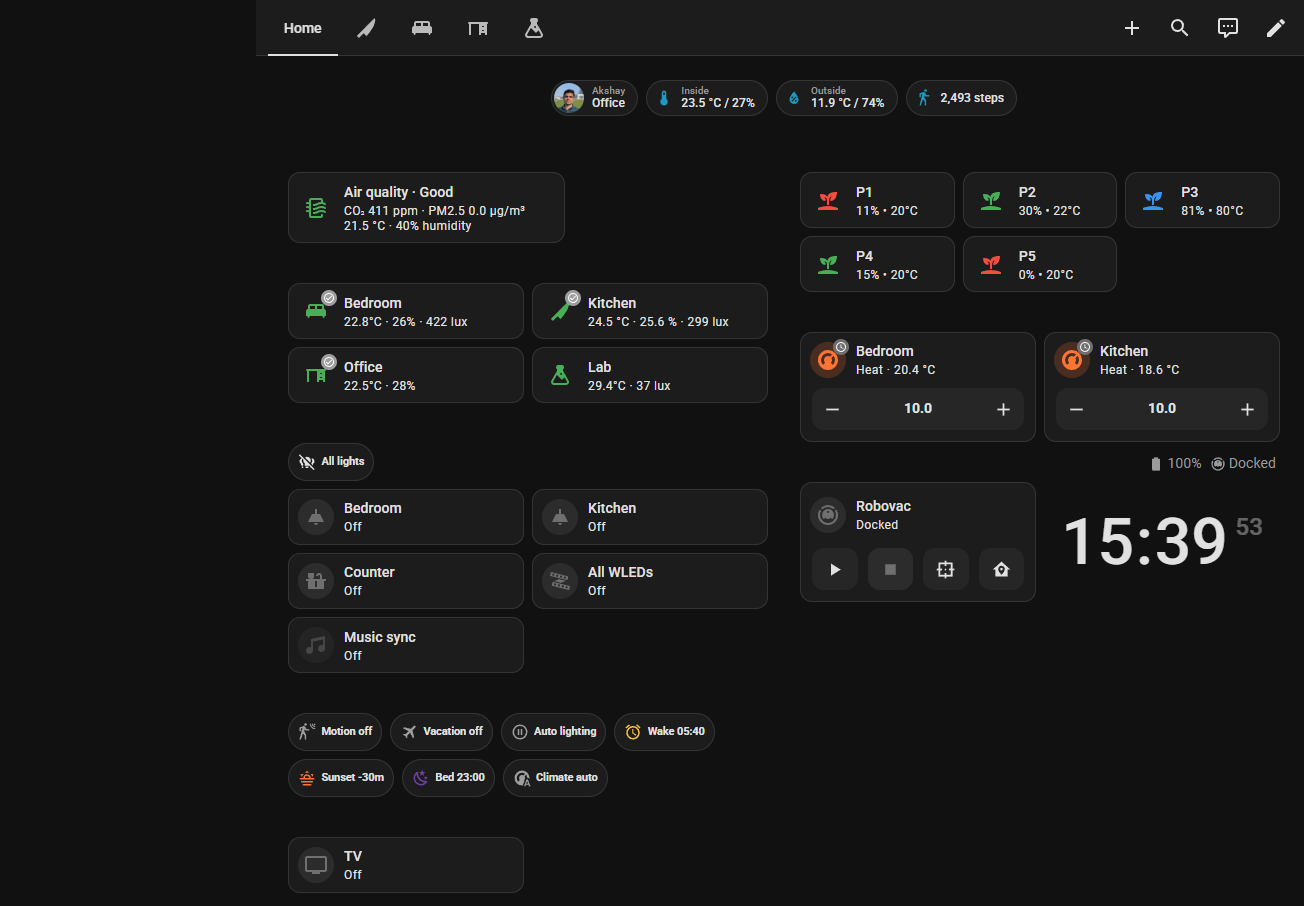
Caption: Music sync on the home view, currently off. The effect, palette, and sliders live on the All WLEDs page. Turning the card on pushes that look to every strip.
The Problem: Nine Web UIs for One Song
WLED’s sound-reactive effects are excellent and annoying in equal measure.
Gravimeter, Freqmap, Noisemeter, GEQ, Puddles — each strip can run them. Each strip also has its own effect dropdown, its own palette, and its own speed and intensity sliders. Setting that by hand on every controller is how you spend the first half of a song in a browser.
I wanted one place to say “all of you, this effect, this palette, these two sliders”, and one place to say “stop, and go back to being lamps.”
What the Switch Actually Does
input_boolean.wled_music_sync is the switch. The group it drives is light.all_wleds.
Turning it on
Before anything changes, the script writes down whether each member is on or off. That string lives in a text helper, one entity=on or entity=off per strip.
Then it walks the group:
- Turn each strip on with the selected effect (Gravimeter by default)
- Set the shared color palette, if one is selected
- Set speed and intensity from the two main sliders (0–255, starting at 128)
A short delay between strips keeps a burst of effect changes from stepping on each other. While this is running, a second helper, wled_music_applying, is on. That matters later, because “turn the group on” normally means “make them lamps”, and music sync is the exception.
Changing it while it is on
Effect, palette, speed, and intensity are all triggers. The apply script restarts, waits 300 milliseconds, and pushes again. Dragging a slider does not fire a request per pixel of movement.
The effect list is the sound-reactive set I actually use: the Grav* effects, the Freq* effects, Noisemeter and its cousins, Puddles, Pixelwave, GEQ, Waverly, and a few others. A template sensor maps the current effect to the names WLED uses for those sliders. Gravimeter’s first two controls are “Rate of fall” and “Sensitivity”. Freqmatrix wants low bin, high bin, and sensitivity. DJ Light only has speed. The dashboard shows the extra sliders only when that effect has them, and it prints the real names under the first pair.
Turning it off
The stored on/off list is read back.
- A strip that was on returns to the default lamp look
- A strip that was off turns off
The default look is solid, not “whatever effect you had in 2024”:
- Most strips: warm orange (
255, 137, 14) at 50% - The kitchen counter strip: a slightly lighter orange (
255, 159, 70) at 100%
That counter strip is also mirrored with the Tapo bulb next to it, so the counter still behaves as one light when music sync is not running.
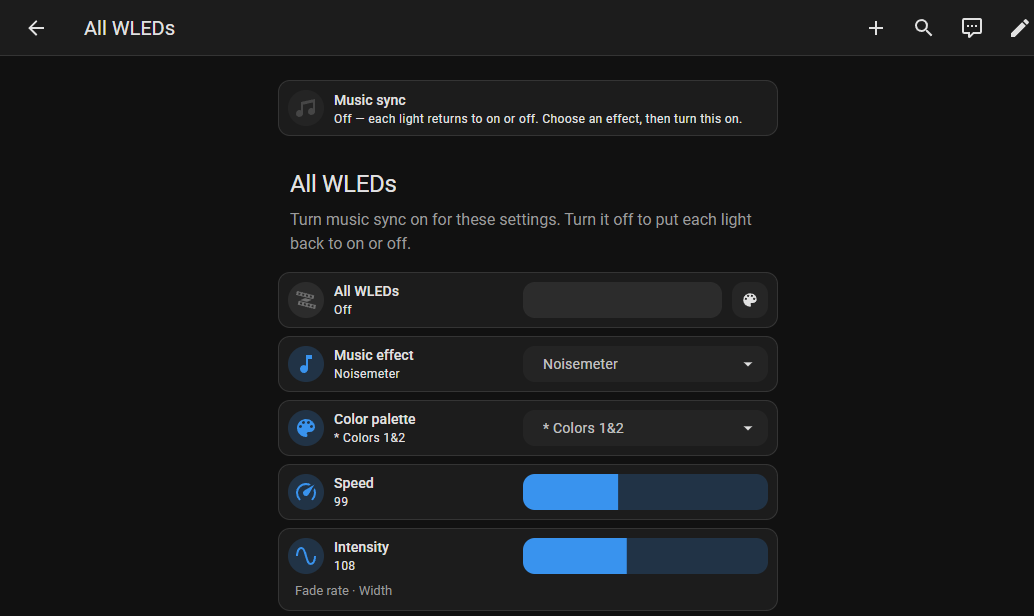
Caption: The All WLEDs view with sync off. Noisemeter is selected, palette is Colors 1&2, speed 99, intensity 108. Under the sliders it shows the names that effect actually uses: Fade rate and Width.
Alexa, Without Turning the Lamps Back into Lamps
Local emulated Hue exposes a short list. No Home Assistant Cloud. The names that matter here are All WLEDs, Music Sync, Plants, Kitchen Counter, Monitor Backlight, and Office Table.
“Alexa, turn on All WLEDs” used to be a trap. The group turning on is also how music sync starts the strips, so a naive automation would see the group come on and immediately paint everything solid orange, right over the effect I just applied.
The guard is wled_music_applying. If that helper is on, the “someone turned All WLEDs on” automation does nothing. If it is off, turning the group on means the lamp look: solid warm orange, music sync cleared. Plants have the same idea on a smaller group. The plant strips go to the same 50% orange, and they stay out of it while music sync is in the middle of applying.
Turning the group off clears music sync first, then turns the members off. The prior-state note is written as “everything was off”, so the sync-off path does not try to restore a lamp look onto strips I just asked to go dark.
The Microphone Controller
The strips run the effect. A separate package, packages/wled_audio.yaml, talks to the microphone controller’s JSON API: read config, read info, write config. The effect sync itself goes through the normal WLED integration (light.turn_on for the effect, the palette select, and the speed and intensity number entities). Home Assistant is picking the look. The controller is the one hearing the room.
What I Would Not Automate
Music sync does not try to be the lighting schedule.
It does not fade with sunset, it does not follow lux, and it does not start because the TV turned on. Those rules already exist, and they are easy to break if a second system also believes it owns the brightness. The switch is manual, or voice. When it is on, it owns the strips. When it is off, the lighting routines pick the room back up.
The part I am glad I wrote down before changing anything is the prior state. Without that list, “turn music off” has to guess, and the guess is always wrong for at least one strip.
What I Learned
- A group turn-on is not a user intent. Something else may have turned the group on. A short “I am applying” flag is enough to tell those apart.
- Restart mode plus a short delay is the right shape for sliders that fan out to a dozen devices.
- Put the effect names in one map. The dashboard and the sensor both read it, so Gravimeter stays “Rate of fall” in both places.
- Restore on/off, not the previous effect. I want lamps back, not a random leftover palette.
Strip rule: if you need the same setting on every controller, you do not have a lighting setup yet. You have a clipboard.